Universities across the sector are currently being targeted by a sophisticated phishing campaign.
How it works
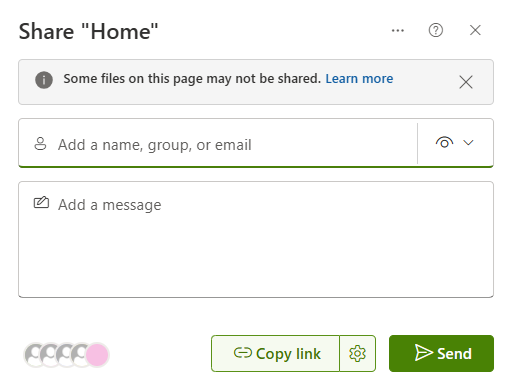
Users will receive what looks like a standard SharePoint document invitation, usually from a colleague or someone you know, sent via Microsoft SharePoint itself (no-reply@sharepoint.com). It looks completely legitimate, which is exactly the point.
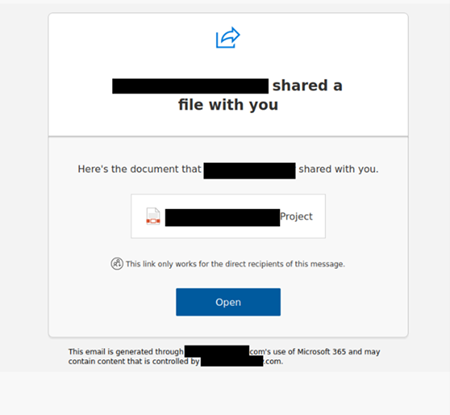
Clicking the above link opened a Word document containing a second link. That second link led to a convincing fake Microsoft 365 login page. Any credentials entered there would have been stolen immediately by the attackers.
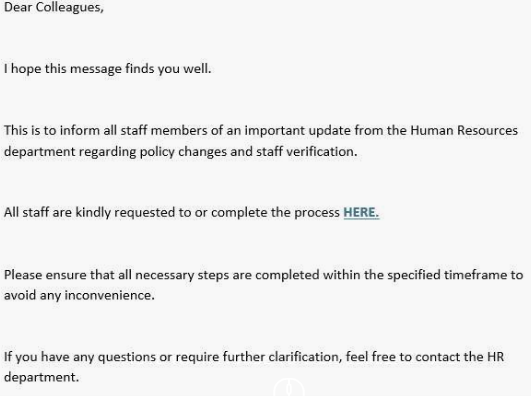
Once credentials are entered, cyber criminals can log in to the victim’s Microsoft account in real time, not just save the details for later.
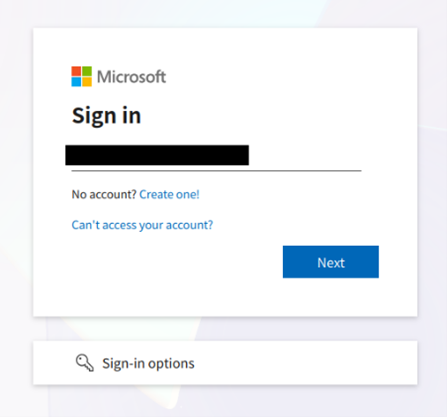
What makes this especially dangerous is that it can defeat multi factor authentication. The fake page also captures your second authentication prompt, allowing scammers to approve it in real time and bypass this protection entirely.
The URL is often the only giveaway which is why checking links carefully before clicking is so important.
What happens once an account is compromised?
Once an account is compromised, it can be used to send further phishing emails to others, meaning fake SharePoint links may appear to come from a colleague or collaborator you recognise. Some are also sent at random to any address.
What to look out for
Pause and ask yourself: am I expecting this document? If in doubt, hover over the link to check the URL. A genuine Microsoft 365 login page will always include “microsoft.com” in the address bar.
Why can’t you block the SharePoint email address?
No-reply@sharepoint.com is a legitimate Microsoft address, as such we’re unable to block it outright. However, we have put additional protective measures in place to catch suspicious emails earlier. If you’re expecting a shared document and it hasn’t arrived, please contact the Information Centre, it may have been quarantined as a precaution.
Best Practice for Sharing Documents saved in SharePoint
If you need to share a SharePoint link with someone, we recommend copying and pasting the link directly into an email rather than using the built-in SharePoint “Send” option. This avoids triggering automated notifications that could be mistaken for phishing or that might get caught by our security filters.
Training and Guidance
Do not click any links or enter your credentials. Contact the Information Centre, who can investigate on your behalf. If you have already clicked a link or entered your details, please get in touch with the Information Centre as soon as possible so we can act quickly to secure your account.
Complete your Cyber Security training
Staff
All staff are required to complete the essential Cyber Security training through Metacompliance. You can access it in two ways:
- Via the dashboard at https://universityofstirling.metacompliance.com
- Via the Metacompliance app in Microsoft Teams (look for it in the left-hand panel)
No login is required; you should be able to start immediately. The course is made up of multiple modules, so you can work through it at your own pace and complete it in stages.
If you haven’t yet completed the training, you’ll receive reminders from CyberAwareness@stir.ac.uk.
Students
All students are required to complete Cyber Resilience and You! You can access this from this Canvas module
Why Cyber security isn’t just for work or studying
Cyber security training isn’t just something we do to tick a box for work or study—it’s a genuine life skill. The things you learn, like spotting phishing emails, protecting your passwords, understanding scams, and keeping your data safe, apply just as much to your personal email, social media, online banking, and shopping as they do to University systems. Cyber crime doesn’t stop at 5pm or stay neatly within work accounts, and attackers rely on people being busy, distracted, or unsure what to look for. Taking the training helps you build confidence, stay alert, and protect yourself, your money, and your digital identity—long after the course is completed.