Now that we’re back after the festive break and pretending the year has eased in gently (it hasn’t), it’s time for our first cyber update of the year. This one’s a quick but important reminder about a phishing scam that’s been doing the rounds.
This time, it’s fake Dropbox emails. These ones are particularly sneaky because they look like something many of us receive every week: a shared file, a folder invite, or a document we’re meant to review. Familiar, routine, and therefore easy to click without thinking too hard.
A public sector organisation was recently targeted by this exact scam which resulted in accounts being compromised, so it feels like a good time to refresh what to look for when it comes to phishing emails.
What did the phishing emails look like?
The emails were designed to resemble legitimate messages from Dropbox, such as the image below.
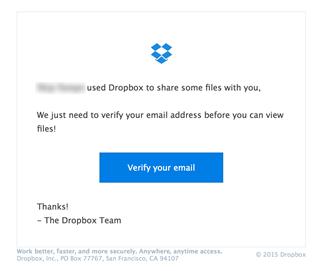
The email stated that the user had been sent a file or folder and used similar wording to “You’ve been invited to view a document” and encouraged you to click a link and enter your credentials before being able to view the document.
You know how this story ends; the link didn’t go to Dropbox but instead, it led to a fake sign-in page designed to capture usernames and passwords. No typos. No obvious red flags. Just quietly dangerous.
Why these scams work so well
We’re used to sharing files. We collaborate across teams, and with people external to the University, many of which use Dropbox or other third-party file sharing tools. So when an email arrives saying “Here’s the file you were sent”, our brains often fill in the gaps and assume it’s legit.
Attackers know this. They rely on:
- Familiar tools
- Busy inboxes
- Quick decisions
- A momentary lapse in attention
That doesn’t mean anyone’s careless, it means the scam is doing exactly what it was designed to do.
What to look out for
A few quick sense checks can really help:
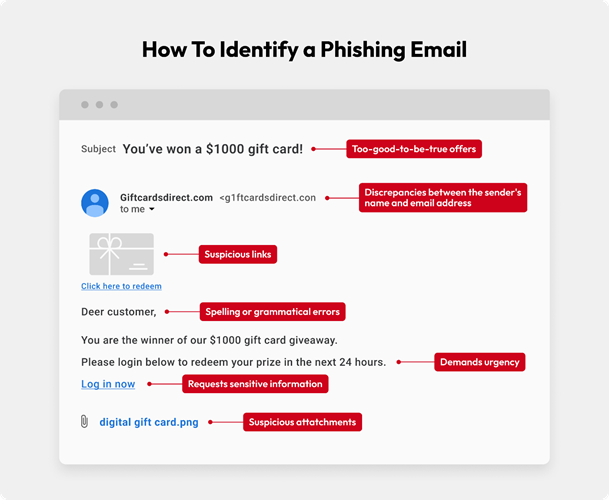
- Were you expecting a file?
If not, pause.
- Check the sender carefully
The display name might look right, but the email address often tells a different story.
- Hover over links
Does the link go to dropbox.com, or somewhere else entirely?
- Urgency and pressure
“View now”, “Access expires”, or “Action required” are classic tactics.
- Unexpected sign-in pages
Be cautious if you’re suddenly asked to log in when you weren’t expecting to.
If something feels slightly off, that’s usually reason enough to stop.
What to do if you receive a suspicious email?
If you think an email might be suspicious:
- Don’t click any links or open attachments
- Use the “Report Phishing” option in Outlook
- Delete the email once reported
Reporting suspicious emails helps protect everyone, not just you. Even if it turns out to be harmless, it’s always okay to report it.
What if you clicked a link or entered details?
First: don’t panic. It happens, and the sooner we know, the easier it is to help.
If you’ve clicked a link, entered your password, or approved anything you’re unsure about:
Contact information.centre@stir.ac.uk immediately as early reporting makes a huge difference.
Cyber Security Training
Around 90% of cyber attacks in universities still begin with a phishing email, according to the UK Government’s Cyber Security Breaches Survey, a statistic that hasn’t shifted much in recent years. Phishing continues to evolve, and these attacks rely heavily on catching people at the wrong moment.
This is where our essential cyber security training plays an important role. All staff are expected to complete the University cyber security training, which includes real-world examples and keeps everyone informed about the latest tactics being used.
Accessing the training
You can access the training via the Dashboard directly:
https://universityofstirling.metacompliance.com
You can also access the training via Teams. The Metacompliance app should be available on the left-hand side bar within Teams.
You will receive reminders if you have not completed the training, these come from no-reply@metacompliance.com as the training is hosted on a third party site.
You will not need to log in and should be able to access the course immediately. You do not need to sit the course in one sitting so you can complete the course, section by section.
Cyber Security Hub
Our Cyber Security Hub has all the information and guidance you need to stay informed and ahead of the latest security threats. It includes a quick refresher here for those who have recently completed the training: Think before you click.mp4
Final thoughts
Phishing emails don’t succeed because people are careless. They succeed because attackers are persistent, clever, and very good at copying things we trust.
Taking a moment to pause, reporting anything suspicious, and keeping training up to date are some of the simplest and most effective ways we can protect ourselves and the University.
Phishing evolves constantly, so staying up to date really does matter.
Report any suspicious activity to information.centre@stir.ac.uk immediately as early reporting makes a huge difference in allowing us to protect the University.